
Knowledge workers lose up to two hours every day trapped in their email inboxes. You read a critical request from a client, realize it requires thirty minutes of focused execution, and leave it marked “unread” in your inbox. By Wednesday afternoon, your inbox is cluttered with forty-five unread emails acting as a chaotic, stressful, and unstructured to-do list.
Learning how to automate task creation from email star flags using no-code integration tools like Zapier or Make completely changes your relationship with email. With a single click of a star or flag icon on your smartphone or desktop, the email is automatically parsed, formatted, and routed directly into your agile sprint board.
Why Your Email Inbox Should Never Be Your To-Do List
Using an email client as a task manager is one of the most destructive productivity anti-patterns in knowledge work. An inbox has zero concept of prioritization: an urgent $10,000 client proposal sits directly adjacent to a 50% discount promotional newsletter from an office supply vendor.

According to workflow automation analyses published by Zapier, separating communication triage from task execution reduces cognitive friction by up to 40%. When your email inbox is reserved exclusively for receiving messages and your sprint board is reserved exclusively for executing work, you eliminate context switching and protect your deep focus.
The 1-Click Triage Rule:
Never leave an email sitting in your inbox to remind you of a task. Star it to trigger your automation, archive the email immediately to reach Inbox Zero, and do the work inside your sprint board.
How the Star-to-Task Automation Workflow Operates
The architecture of this no-code automation follows a clean three-step event trigger loop:
- Trigger (Email Client): You star or flag an email in Gmail, Outlook, or Apple Mail.
- Filter & Transform (Zapier / Make): The automation tool extracts the email subject, sender name, message body snippet, and a direct permanent link back to the email thread.
- Action (Sprint Manager): A new card is created automatically in your project management app (Trello, Notion, Asana, ClickUp, or Todoist) under your “Inbox / Triage” list.
This allows you to conduct rapid morning email sweeps on your mobile phone without ever opening your project management app. When you sit down at your workstation, your tasks are cleanly staged and ready for prioritization. If you are learning how to transition from to-do lists to 5-day task sprints, this automated bridge keeps your backlog organized with zero manual data entry.
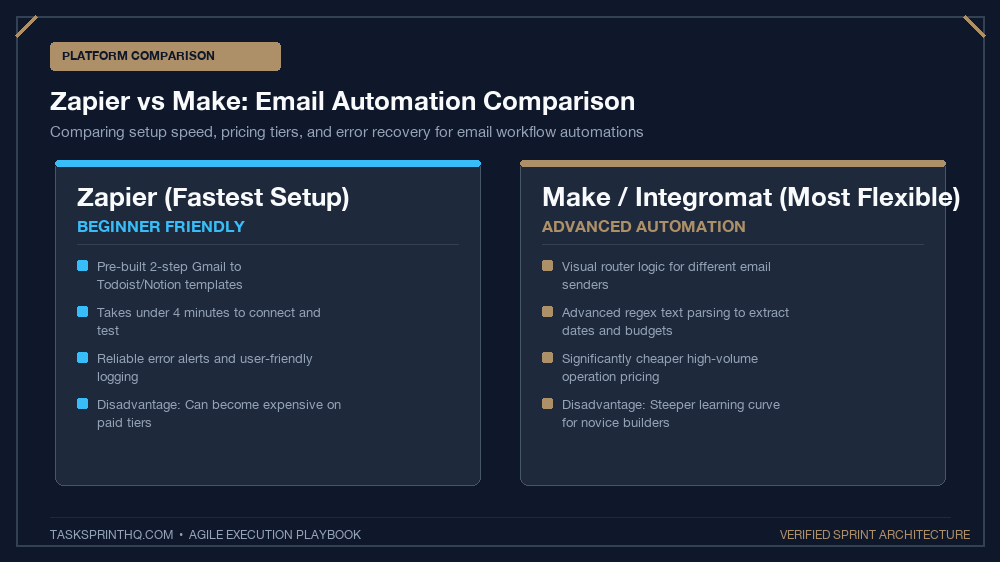
Zapier vs. Make: Which Automation Platform to Choose
Both Zapier and Make handle email automation with ease, but they appeal to different user needs:
| Dimension | Zapier | Make (formerly Integromat) |
|---|---|---|
| Ease of Setup | Ultra-simple; 5-minute linear setup wizard | Visual node canvas; slightly steeper learning curve |
| Free Tier Quota | 100 tasks / month (Restricted on free plan) | 1,000 operations / month (Generous free tier) |
| Data Formatting Control | Good; requires separate “Formatter by Zapier” steps | Exceptional; advanced regex and text parsing built-in |
| Trigger Speed | Instant webhooks on premium; 15 mins on free | Instant webhooks available; 15 mins schedule free |
Step-by-Step Setup in Zapier (Gmail to Trello/Notion)
Follow these five simple steps to construct your first automated email triage Zap:
Step 1: Configure the Trigger
Create a new Zap. Choose Gmail as your trigger app and select New Starred Email as the event. Connect your Google account and test the trigger by starring a recent email in your inbox.
Step 2: Add a Formatter Step (Clean Text Extraction)
Add a step using Formatter by Zapier (Text). Choose “Truncate” to limit the raw email body to the first 500 characters. This prevents giant email signatures or legal disclaimers from cluttering your task description.
Step 3: Configure the Destination Action
Select your task manager (e.g., Trello, Notion, or Asana). Choose Create Card / Create Page as the action event. Map the data fields:
- Task Title:
[Email] {Subject} (from {From Name}) - Task Description:
Snippet: {Body Plain Text}Direct Email Link: {Message URL}
- Destination List:
Inbox / Unsorted Backlog
Step 4: Turn on the Zap and Test
Click “Publish”. Open your email client, star an email, and refresh your project board. Within moments, your newly created task card appears with the direct link embedded, ready for action.
Handling Urgent Incoming Requests Mid-Sprint
What happens when an automated email task represents a sudden, unexpected emergency? Never pull it directly into today’s active sprint without evaluation. Filter it through our battle-tested protocols for handling unplanned tasks mid-sprint without derailing goals to determine whether it warrants an immediate scope swap.
Advanced Make.com Scenario: AI Filtering Before Task Creation
Power users using Make (formerly Integromat) can take email automation a step further by inserting an OpenAI or Anthropic API module between the email trigger and the task creation action. When an email is starred:
- The AI module reads the email body, strips out conversational pleasantries, and extracts the core action item.
- The AI generates a concise, 1-sentence task title and suggests an effort rating (Small, Medium, Large).
- Make routes the sanitized, pre-formatted task card directly into your sprint board with estimated tags attached.
This automated preprocessing saves hours of manual card editing and ensures your incoming backlog is uniformly formatted.
Routing Email Attachments to Cloud Storage Automatically
When clients send project assets via email, do not manually download them to your local hard drive only to re-upload them to your project board. Configure your Zapier or Make scenario with a conditional branch: if the incoming starred email contains file attachments, automatically upload the files to a dedicated project folder in Google Drive or Dropbox, and paste the direct file link into the task card description.
Security Best Practices for Automated Email Parsing
Because automated integration tools like Zapier and Make access your email inbox, always follow strict credential hygiene. Connect your email account using OAuth2 with scoped permissions rather than plain passwords, and ensure that sensitive financial details, passwords, or confidential HR emails are excluded from task routing using Zapier’s built-in filter conditions.
Achieve True Inbox Peace of Mind
Stop using your email inbox as an agonizing monument to unfinished work. Automate your email star flags into sprint tasks this afternoon, reach Inbox Zero with confidence, and enjoy the calm focus of a centralized, automated productivity pipeline.