

Modern project management software has developed an obsession with feature bloat. Enterprise tools like Jira, ClickUp, and Monday.com bombard independent professionals with custom automation builders, sprint velocity forecasting dashboards, multi-tier permission matrixes, and incessant notification pings. For a solo creator or boutique consultant, managing the tool often takes more cognitive effort than executing the client work.
When you work alone, you need an agile board that gets out of your way. We tested dozen of lightweight workflow tools to isolate the four best minimalist Kanban apps for solopreneurs that prioritize speed, clean typography, and zero-distraction execution.
What Makes a Kanban Tool ‘Minimalist’?
To qualify as a genuine focus tool, a task board must satisfy four strict operational criteria:
- Sub-Second Load Times: The app must open instantly with zero loading spinners or splash screens.
- Zero Notification Noise: No automated email summaries, bot alerts, or upsell popups while you work.
- Strict Column Restraint: Support for lean 3-column workflows without forcing complex corporate hierarchies.
- Keyboard Navigation: The ability to add, edit, and move cards across columns without touching the mouse.
The 4 Best Distraction-Free Kanban Apps Tested
1. Linear (For Solo Builders & Engineers)
While originally designed for software product teams following the Linear Method, Linear is widely revered by independent technical creators. Its interface is blazing fast, features instant keyboard shortcuts for every action, and treats task management like an elegant text editor rather than a bloated enterprise database.
- Key Strength: Unmatched speed, markdown support, clean dark mode aesthetic.
- Best For: Solopreneur developers, technical SaaS builders, and indie hackers.
- Pricing: Generous free tier for solo operators.
2. Kanboard (For Open-Source & Privacy Purists)
Kanboard is a self-hostable, open-source Kanban board that strips away all modern web bloat. It has zero telemetry, zero animations, and focuses entirely on Work-In-Progress (WIP) limits. If you want a board that lives on your private server or local machine with absolute data sovereignty, Kanboard is unrivaled.
- Key Strength: 100% self-hosted, strict WIP limits, zero external tracking.
- Best For: Privacy-conscious consultants and privacy-first professionals.
- Pricing: 100% Free and open-source.
3. Notion Minimalist Kanban (For Content Creators)
While Notion can become bloated when over-engineered, a stripped-down single-database Kanban board inside Notion remains the most flexible setup for creators who need to write long-form content directly inside cards. If you want to compare its tradeoffs against heavier platforms, see our breakdown of Notion vs ClickUp for personal sprint tracking.
- Key Strength: Unlimited card body canvas for drafting articles, video scripts, and client notes.
- Best For: Writers, newsletter authors, and content-driven solopreneurs.
- Pricing: Free personal plan.
4. Trello (With Power-Ups Stripped)
Despite being acquired by enterprise software conglomerate Atlassian, plain vanilla Trello without power-ups remains one of the simplest tactile card interfaces in existence. Its visual drag-and-drop mechanics feel like real sticky notes on a whiteboard.
- Key Strength: Universal familiarity, zero onboarding friction, reliable mobile sync.
- Best For: Visual thinkers and non-technical freelancers.
- Pricing: Free for up to 10 boards.
Minimalist Kanban Feature Matrix
| App Name | Speed & Latency | Offline Support | WIP Limits | Recommended Solo Persona |
|---|---|---|---|---|
| Linear | Sub-100ms (Blazing) | Full native offline cache | Native cycles & limits | SaaS founders, developers |
| Kanboard | Instant (Static HTML) | Localhost installable | Strict column limits | Open-source advocates |
| Notion (Lean) | Moderate | Partial | Formula-based limits | Writers & creators |
| Trello | Fast | Mobile offline cache | Requires power-up | Visual freelancers |
The 3-Column Solopreneur Rule:
Regardless of which software you select, restrict your active board to three columns: To Do (Max 5), Doing (Max 1), and Done (Weekly Archive). For instructions on configuring WIP limits, read our solopreneur Kanban board setup guide.
The Enterprise Tool Fatigue Plague
Open Jira, Asana, or Monday.com in 2026, and you are immediately bombarded with popup product tours, AI upsell banners, enterprise permission hierarchies, and multi-tier configuration menus. For large corporations with 2,000 employees, these features provide administrative control. For solopreneurs, independent creators, and agile freelancers, they represent pure operational drag.
Every second spent navigating nested dropdown menus, configuring custom issue types, or waiting for bloated web applications to render JavaScript bundles is energy stolen from shipping revenue-generating work. High-velocity operators thrive on minimalist tools engineered according to the Linear Method: speed as a feature, keyboard shortcuts, and zero cognitive clutter.
In-Depth Review: The 4 Best Minimalist Kanban Apps
1. Linear: The Gold Standard for Developer Velocity
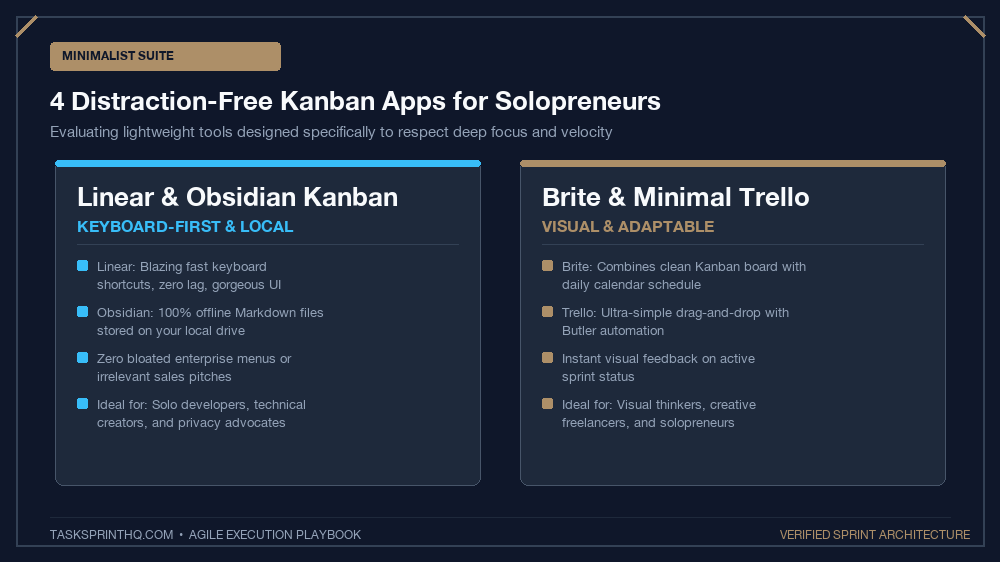
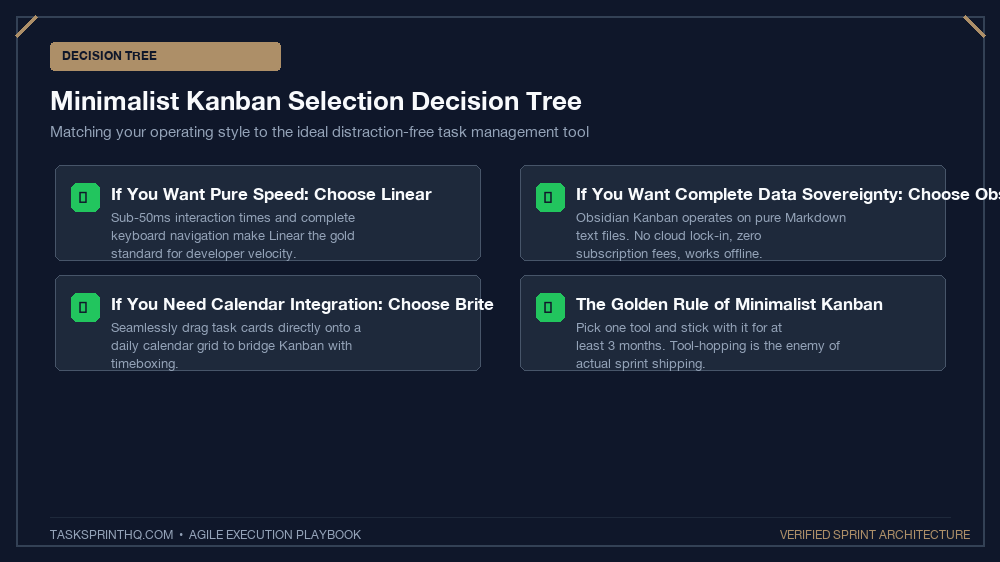
Originally designed for high-growth software teams, Linear has become a cult favorite among solo technical founders. Its interface renders in sub-50 milliseconds, allowing you to create, tag, and transition tasks without your fingers ever leaving the keyboard:
- Killer Feature: Blazing-fast keyboard navigation (press
Cto create,Sto change status,Pto set priority). - Best For: Solo engineers, indie hackers, and technical solopreneurs building SaaS or digital products.
- Price: Free for solo operators (up to 250 active issues).
2. Obsidian Kanban: 100% Offline Markdown Sovereignty
If you value absolute privacy, zero cloud dependency, and complete control over your data, the Obsidian Kanban community plugin is unmatched. Your Kanban board is stored as a simple, human-readable .md text file on your local hard drive:
- Killer Feature: True data sovereignty. If Obsidian ever shuts down, your tasks remain safe as plain text.
- Best For: Writers, privacy advocates, researchers, and creators who manage their second brain locally.
- Price: 100% Free and open-source.
3. Brite: The Hybrid Calendar-Kanban Workspace
Brite bridges the gap between horizontal Kanban columns and vertical daily calendar schedules. You can drag an item directly from your ‘In Progress’ Kanban lane onto a 2:00 PM calendar slot to create an instant timebox:
- Killer Feature: Integrated day planner view that eliminates the need for separate calendar and task apps.
- Best For: Solopreneurs who practice daily timeboxing and visual scheduling.
- Price: Free tier available; Pro at $4.50/mo.
4. Trello Minimal: Stripped-Back Cloud Simplicity
While standard Trello has accumulated marketing features over time, running a bare-bones 3-list board with all power-ups disabled remains one of the fastest, most reliable ways to manage client projects without training friction. Pair this setup with our Trello sprint board client project guide for optimal results.
Feature Benchmark: Minimalist Kanban Apps
| Application | Load Speed | Offline Support | Keyboard Shortcuts | Ideal Solopreneur Persona |
|---|---|---|---|---|
| Linear | Sub-50ms (Ultra-Fast) | Full Offline Cache | 100% Keyboard Driven | Software Developers & Indie Hackers |
| Obsidian Kanban | Instant (Local Drive) | 100% Native Offline | Vim / Markdown Keys | Writers & Second Brain Builders |
| Brite | Moderate | Mobile Cache | Standard Mouse / Touch | Timeboxers & Visual Planners |
| Minimal Trello | Fast | Mobile App Only | Basic Shortcuts | Freelancers Managing Client Portals |
How to Migrate to a Minimalist Board in 30 Minutes
To purge tool clutter and reclaim your velocity today, follow this 4-step migration sequence:
- Export Your Active Queue: Export only items that have been actively worked on in the last 14 days. Leave the rest behind.
- Set Up Exactly 3 Columns:
Backlog,In Progress (WIP: 2), andDone. Refuse the temptation to add ‘Pending Review’, ‘Icebox’, or ‘Blocked’ until you have shipped 20 cards. - Enforce Work-In-Progress Discipline: Adopt our solopreneur Kanban board setup rules: never drag a card into In Progress until the current card is 100% shipped.
- Bookmark the Board to Your Browser Bar: Set your new board as your default morning browser tab so it greets you before email or social media.
Frequently Asked Questions
Why should a solo founder avoid Jira?
Jira is engineered for enterprise organizations with dozens of departments, complex approval chains, and governance policies. For a solo founder, Jira adds hours of unnecessary administration.
Can I use a physical whiteboard instead of a Kanban app?
Yes. A physical whiteboard in your office provides unmatched tactile focus and zero digital distractions. Digital apps are only necessary if you travel frequently or require external cloud backups.
What is the most important feature of a Kanban board for solopreneurs?
Work-In-Progress (WIP) limits. Limiting your ‘Doing’ column to exactly 1 or 2 cards prevents multitasking and guarantees completion.
Does Linear require coding knowledge to use?
Not at all. While built with developer sensibilities, Linear’s core Kanban boards and keyboard shortcuts can be used by any writer, designer, or consultant.
How often should I clear the ‘Done’ column?
Archive your ‘Done’ column during your Friday retrospective. Starting Monday with a clean ‘Done’ container provides a fresh psychological start for the new sprint cycle.