

Most Notion productivity dashboards fail for solo operators for a predictable reason: they are built as static archive libraries rather than active execution engines. When you open a dashboard cluttered with dozens of databases, progress bars, and speculative project ideas, your brain spends its peak morning energy organizing cards rather than shipping actual deliverables.
A functional solo sprint planning system in Notion requires the opposite philosophy: radical data isolation. By connecting four simple databases through relational properties, you create a focused command center that hides 95% of your backlog noise and surfaces only the exact three to five commitments locked into your current weekly cycle.
The Structural Architecture: The 4 Core Databases
According to agile product delivery frameworks documented by Atlassian, successful sprint cycles require strict separation between long-term roadmaps and immediate operational commitments. In Notion, we achieve this through four relational databases:

- Goals & Milestones (Quarterly Horizon): High-level objectives that define directional intent (e.g., ‘Launch V2 Client Portal’ or ‘Publish 30 Technical Guides’).
- Projects (Monthly Horizon): Concrete multi-step initiatives that roll up to a quarterly milestone.
- Sprint Cycles (Weekly Horizon): Fixed Monday-to-Friday timeboxes with locked status flags and start/end date properties.
- Sprint Tasks (Daily Horizon): Atomic deliverables sized for completion within a single deep work session.
The Notion Scope-Lock Rule:
Never filter your main daily view by ‘All Incomplete Tasks’. Filter strictly by: Sprint Cycle = Current Active Sprint AND Status = In Progress or Up Next. If a task is not part of this week’s locked container, it must remain invisible during focus hours.
Step-by-Step Setup: Building the Databases
Step 1: Configure the Sprint Cycles Database
Create a dedicated database named Sprint Cycles. Add the following essential properties:
- Name (Title): Format as
Sprint 42 (Oct 12 – Oct 16). - Date Range (Date): Start and end dates for the 5-day cycle.
- Status (Select): Options: Upcoming, Active (Locked), Completed.
- Retrospective Notes (Text): Brief reflection captured during your Friday shutdown.
Step 2: Build the Sprint Tasks Database
Create the second database named Sprint Tasks. This is where your daily execution happens. Configure these properties:
- Task Name (Title): Action-oriented verb phrase (e.g., ‘Draft authentication spec sheet’).
- Sprint Relation (Relation): Connects directly to the
Sprint Cyclesdatabase (one-way or bidirectional). - Status (Status): Backlog, Ready, In Progress, Review, Done.
- Effort Estimate (Number): Story points or estimated deep work hours (1 to 5 points max).
- Day Assigned (Select): Monday, Tuesday, Wednesday, Thursday, Friday.
Notion Sprint Architecture vs Traditional Boards
| System Attribute | Unstructured Notion Kanban | 4-Database Sprint System |
|---|---|---|
| Backlog Management | Everything visible in one infinite column | Filtered into triage storage until planning ritual |
| Daily Cognitive Load | High (endless scrolling, decision friction) | Low (only today’s 3 committed items visible) |
| Mid-Week Scope Creep | Unrestricted additions derail weekly focus | New tasks auto-route to the next upcoming cycle |
| Velocity Tracking | None; tasks vanish upon completion | Weekly completion percentage calculated cleanly |
How to Run Your Monday Morning Planning in Notion
To run this system efficiently, limit your planning ceremony to 20 minutes every Monday morning. Follow this structured sequence:
- Open your
Sprint Cyclesdatabase and create a new record marked as Active (Locked). - Review your quarterly project roadmaps and identify the top three deliverables required this week.
- Filter your task triage view for unassigned backlog cards. Relate exactly 12 to 18 story points worth of work to the new sprint cycle. If you are unsure how to evaluate realistic workload bounds, check our guide on running a personal daily sprint framework.
- Group your Notion board view by the Day Assigned property to balance your cognitive load across the week.
- Lock the Notion database view so accidental clicks do not alter properties during deep work hours.
The Friday Retrospective in Notion
On Friday afternoon at 4:30 PM, switch your Notion view to the retrospective layout. Inspect unfinished cards and ask three operational questions:
- Were unfinished cards blocked by external dependencies, or were initial time estimates overly optimistic?
- Did unplanned emergency requests consume more than 20% of your calendar hours?
- What single operational improvement will you enforce in next week’s sprint cycle?
Record these observations directly in the Sprint record’s retrospective field, mark the cycle status as Completed, and transition to your weekend. For a complete review checklist, copy our free weekly sprint review template for freelancers.
Step-by-Step Setup: Building the 4 Notion Databases
To implement this agile engine in your personal workspace, create four interrelated databases in a dedicated Notion page titled Sprint HQ. Follow these exact property schemas to maintain relational integrity:
1. The Epics Database (High-Level Vision)
This database tracks quarterly milestones and strategic initiatives. Essential properties include:
- Epic Name (Title): e.g., ‘Launch TaskSprintHQ Video Playbook’ or ‘Q4 Client Retention Retainer’.
- Status (Select):
Backlog,Active,Shipped,Archived. - Target Quarter (Select):
Q1,Q2,Q3,Q4. - Sprints (Relation): Two-way relation linking directly to the Sprints Database.
- Total Story Points (Rollup): Calculates the sum of story points across all related active tasks.
2. The Sprints Database (Timebox Governance)
Your Sprints database enforces strict 7-day or 14-day boundaries. Never allow tasks to exist outside an assigned sprint:
- Sprint Title (Title): e.g., ‘Sprint 42: Onboarding Flow Redesign’.
- Sprint Dates (Date): Fixed start and end date (e.g., Monday 9:00 AM to Friday 5:00 PM).
- Status (Status):
Future,Current,Closed. - Committed Velocity (Number): Total story points budgeted for this cycle using our daily sprint capacity calculation rules.
- Completion Rate (Formula):
round((prop("Completed Points") / prop("Committed Velocity")) * 100) + "%".
3. The Tasks Database (Daily Sprint Execution)
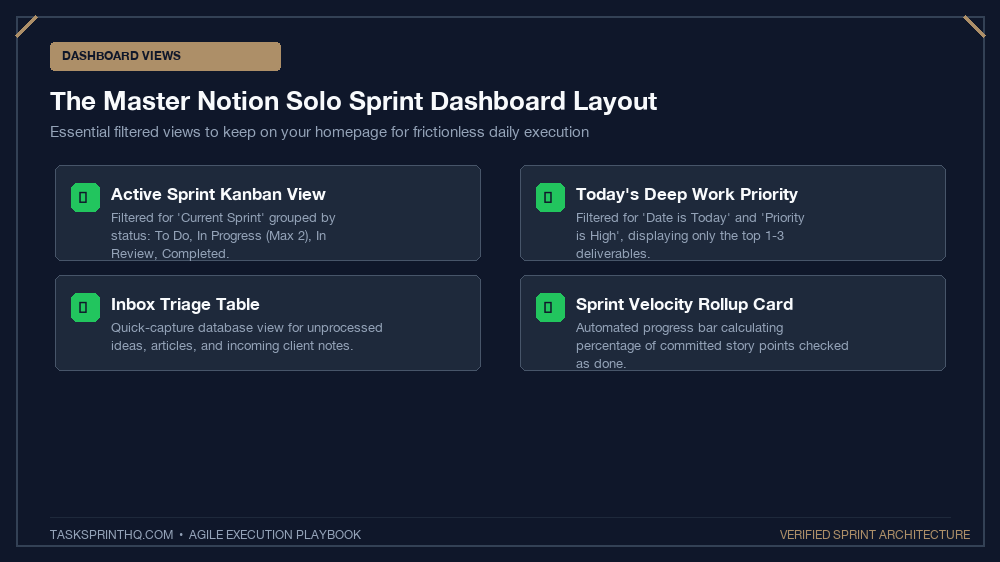
This is where your daily deep work lives. To avoid endless scrolling, configure filters so only tasks matching Sprint = Current and Status != Done appear on your primary dashboard:
- Task Name (Title): Action-first verb phrasing (e.g., ‘Draft hero copy for checkout page’).
- Sprint (Relation): Links to the Current Sprint.
- Story Points (Select): Fibonacci numbers:
1,2,3,5,8. - Status (Status):
To Do,In Progress (WIP: 2),Review,Done. - Definition of Ready Met? (Checkbox): Ensures assets and scopes are locked before starting.
4. The Daily Sprint Log Database (Retrospectives & Accountability)
A lightweight database documenting your morning standup commitment and evening retrospective notes. Pair this with our sprint backlog grooming checklist every Sunday evening to keep your active queue razor-sharp.
The Friday Sprint Turnover Ceremony in Notion
A solo sprint system fails if you do not formally close the sprint loop. Every Friday at 4:30 PM, run this 15-minute turnover sequence:
- Audit In-Progress Items: Any task remaining in ‘In Progress’ must be evaluated. If 80% finished, break off the remaining 20% into a new 1-point task for next week; do not roll incomplete 8-point monoliths forward.
- Calculate Final Velocity: Record total completed points in your Sprints database. Track this rolling average over 4 weeks to determine your true capacity baseline.
- Mark Current Sprint as ‘Closed’: Switch the status tag to
Closed. Your dashboard views will instantly clear, giving you profound psychological relief over the weekend. - Initialize Next Sprint: Switch next week’s sprint card to
Currentand pull top-ranked tasks from your backlog. For alternative tool comparisons, explore our guide on Notion vs ClickUp for personal sprint tracking.
3 Common Notion Agile Mistakes Solopreneurs Make
Avoid Database Over-Engineering:
The #1 failure mode in Notion is spending three hours designing complex visual widgets rather than shipping actual deliverables. Keep properties strictly limited to what informs today’s execution. If a property doesn’t directly help you prioritize or unblock work, delete it.
Additionally, avoid maintaining unlinked task databases across multiple workspace pages. Centralize all action items into the single master Tasks database and surface them via linked database views across your client or project pages.
Frequently Asked Questions
Should I use Notion’s native Sprint Boards feature or build a custom database?
Custom relational databases offer significantly greater control over custom formula calculations, retrospective archives, and rollups than Notion’s default sprint templates, which can be rigid for non-developer workflows.
What happens if an urgent client emergency occurs mid-sprint?
If an authentic crisis demands immediate attention, execute a 1-in-1-out trade: swap one existing committed sprint task back to the backlog to preserve your locked capacity ceiling.
How many tasks should a solo creator commit to per weekly sprint?
Aim for 3 primary deliverables and no more than 6 secondary support tasks per week. Solopreneurs who commit to more than 10 total deliverables experience an 80% failure rate due to daily operational friction.
Can this Notion sprint structure integrate with Google Calendar?
Yes. By syncing your Notion Task date properties with tools like Notion Calendar or Make/Zapier, each scheduled task block can auto-populate as an event on your timeboxed calendar.
Is Notion better than ClickUp for solo agile sprints?
Notion excels in visual customization and combining docs with task boards. If you require automated recurring sprint cycles and native burndown charts without setup time, ClickUp may be faster out of the box.