

Solopreneurs and independent creators carry an immense cognitive burden: you must conceive the vision, execute the deliverables, manage client communication, and administer billing all on your own. When multiple projects run simultaneously, mental tracking breaks down, tasks slip through cracks, and persistent anxiety takes root.
Designing an optimized solopreneur kanban board setup solves this organizational crisis. By externalizing your entire workflow into a visual, pull-based system governed by strict Work-In-Progress (WIP) limits, you eliminate context-switching bottlenecks and build an unstoppable engine of solo delivery.
Why Traditional Kanban Must Be Adapted for Solo Work
Kanban originated in Toyota manufacturing facilities and was later codified for software engineering teams. According to official principles defined by Kanban University, Kanban improves throughput by visualizing workflow, limiting work in progress, and managing flow.
However, textbook enterprise Kanban setups fail when applied to solopreneurs. Corporate boards assume dedicated roles (e.g., developers separate from testers, separate from product managers). When you are the only human moving cards across the board, standard multi-stage handoffs create redundant overhead. A solo Kanban board must be lightweight, radically visual, and fiercely protective of your attention.
The Solopreneur Kanban Rule:
Stop starting, start finishing. The measure of your productivity is not how many projects you have opened; it is how many completed deliverables reach the ‘Done’ column each week.
The 5 Essential Columns for a Solo Kanban Board
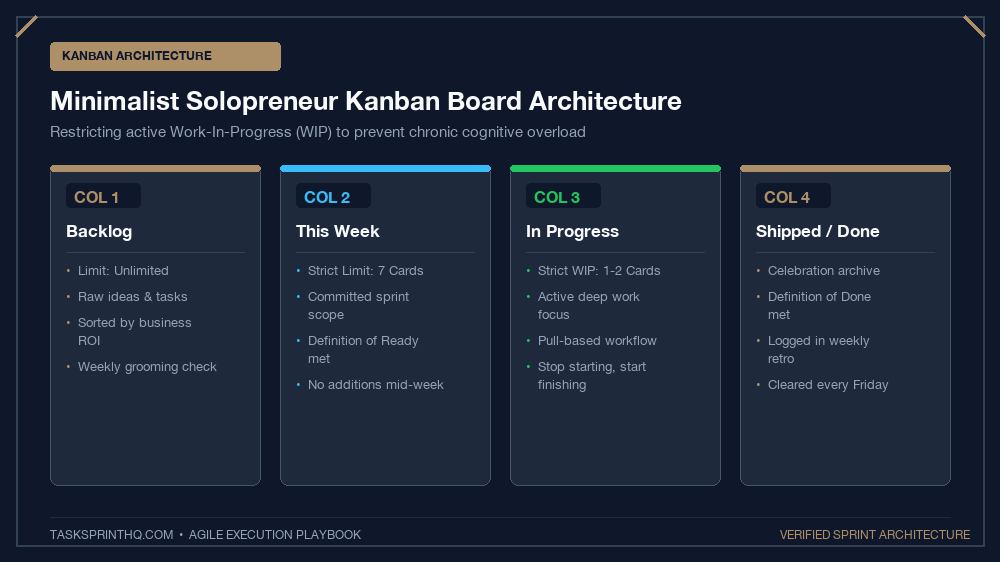
Avoid overly complicated ten-column boards. A high-leverage solopreneur board requires exactly five distinct columns:
1. Master Backlog (The Idea Icebox)
This is your unfiltered holding space for upcoming projects, feature enhancements, client requests, and marketing concepts. Categorize cards using simple color labels (Client Work, Internal Product, Business Admin). Items here are uncommitted; they have no deadlines and demand zero daily attention.
2. Next Up / This Week’s Sprint (Max WIP: 5)
During your weekly planning ritual, pull three to five high-priority cards from your Master Backlog into this column. These represent your non-negotiable commitments for the upcoming week. To properly size these commitments, apply our mathematical guide on daily sprint capacity calculation so you never overcommit.
3. Today’s Focus (Strict WIP: 1 to 2)
Each morning, select one (maximum two) cards from “Next Up” and place them here. This column represents your active operational horizon for the day. If a card is not in this column, it is completely invisible to your active working hours.
4. Doing / In Progress (Strict WIP Limit: 1)
This is the most critical constraint on your entire board: your WIP limit for ‘Doing’ is strictly ONE. Humans cannot perform dual-task deep focus. If you are writing a proposal, that is the only card in Doing. If you switch to fixing a code bug, you must physically drag the proposal card back to ‘Today’s Focus’ first.
5. Done (Shipped & Billed)
The celebration column. Never auto-delete cards upon completion. Allow them to accumulate throughout the week. On Friday afternoon, reviewing your stacked Done column provides immense psychological satisfaction and proves your momentum. If you use Trello for client work, check out our companion walkthrough on how to set up a Trello sprint board for client project management.
Solo Kanban Architecture: Column Specifications
Here is how your board columns, WIP limits, and operational rules align to enforce disciplined workflow:
| Column Name | WIP Limit | Purpose / Function | Movement Trigger |
|---|---|---|---|
| 1. Master Backlog | Unlimited | Raw storage for uncommitted ideas and client requests | Added freely during brainstorming or client calls |
| 2. Next Up (Sprint) | Max 5 Cards | Committed deliverables for current 5-day cycle | Pulled during Monday weekly sprint planning |
| 3. Today’s Focus | Max 2 Cards | Active commitments for today’s workday | Pulled during morning standup routine |
| 4. Doing (Active) | Strict 1 Card | The exact deliverable open on screen right now | Pulled immediately before beginning deep work |
| 5. Done | Cleared Weekly | Shipped deliverables ready for invoicing or archiving | Moved when acceptance criteria are 100% satisfied |
The Optional 6th Column: ‘Waiting / Blocked’
As a solopreneur, you frequently depend on client feedback, external approvals, or vendor asset deliveries. What happens when a card in ‘Doing’ is blocked because you are waiting on client approval? Never leave it sitting in ‘Doing’—that destroys your WIP limit integrity.
Create a narrow, dedicated Waiting / Blocked column between Doing and Done. When a task requires external action:
- Attach a bright red tag or label:
BLOCKED: Client Feedback. - Add a note documenting exactly when you followed up and what is needed.
- Move the card to ‘Waiting / Blocked’, freeing your ‘Doing’ slot to pull the next priority task.
The 3 Inviolable Rules of Solo Kanban
A Kanban board is only as effective as the discipline you enforce around it. Commit to these three non-negotiable operating rules:
Rule 1: Respect the WIP Limit Under All Circumstances
The instant your ‘Doing’ column has more than one card, your productivity plummets. Multitasking is an illusion that increases error rates and doubles project completion times. If you feel compelled to start something new, finish your active card first.
Rule 2: Never Let Cards Languish Without Definition
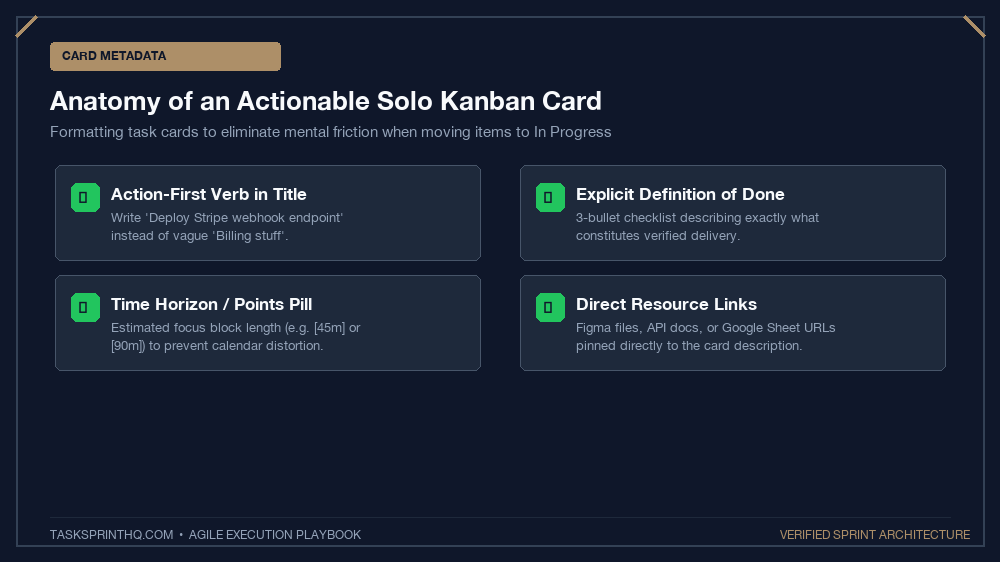
Before any card moves from Master Backlog into ‘Next Up’, it must have a clear “Definition of Done”. If a card merely reads “Website”, it is not ready. Update it to: “Export final Figma wireframes for homepage and share review link with client.”
Rule 3: Conduct the Friday Board Flush
Every Friday afternoon, review your ‘Done’ column. Verify that every completed item has been invoiced or billed. Then archive all completed cards to reset your board for Monday morning. Starting each week with an uncluttered visual workspace creates extraordinary creative calm.
Recommended Software for Solo Kanban
You can implement this setup on almost any modern visual tool:
- Trello: Best for ultra-clean simplicity and robust mobile apps.
- Notion: Ideal if you want your Kanban board directly linked to project docs and client databases.
- Linear: Perfect for technical solopreneurs who appreciate blazing keyboard shortcuts and git integration.
- Physical Whiteboard: Post-it notes on a wall remain unbeatable for visceral, tactile satisfaction.
Build Your Solo Board Today
Solopreneurship should bring autonomy and joy, not chronic administrative chaos. Set up these five simple columns, enforce your single-card WIP limit, and experience the immense focus of a streamlined solopreneur Kanban board setup.