Solopreneurs, freelance consultants, and indie builders constantly search for the ultimate productivity command center. In recent years, two modern platforms have dominated the conversation: Notion, the aesthetic relational database and modular workspace, and ClickUp, the feature-dense, purpose-built project management powerhouse.
Deciding between notion vs clickup personal sprint tracking comes down to a fundamental philosophical choice: do you want an infinite blank canvas where you engineer custom agile workflows from scratch, or an out-of-the-box system pre-loaded with sprint automations, native timers, and velocity metrics?
Deconstructing the Two Software Philosophies
Before diving into performance metrics, we must understand the core architecture of each tool.
Notion: The Modular LEGO Kit
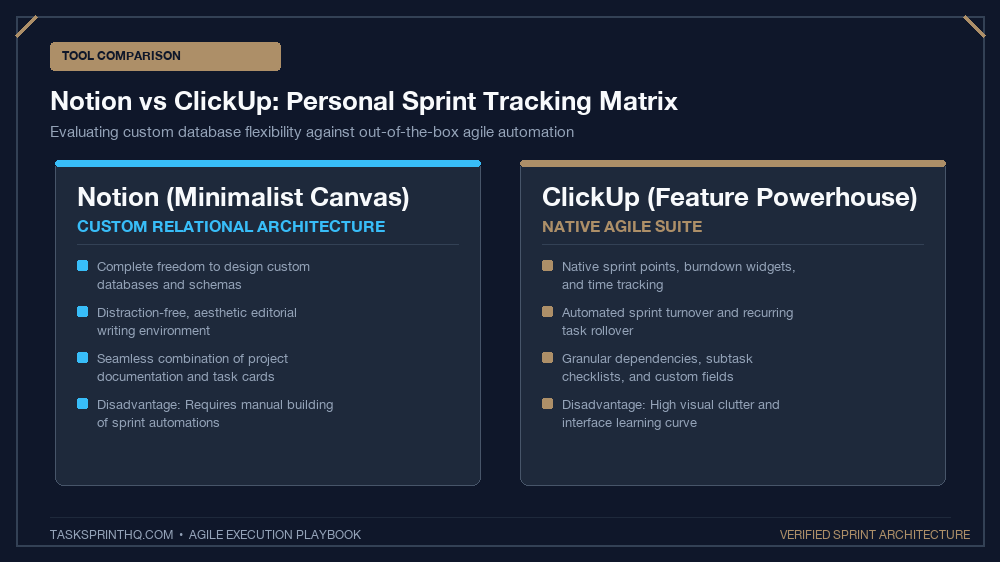
Notion is essentially an interconnected database engine wrapped in a beautiful, minimalist document interface. As detailed in agile workflows documented by Notion, its greatest strength is total structural flexibility. You can build sprint boards that link seamlessly to client billing notes, user interview transcripts, and knowledge wikis without switching browser tabs.
ClickUp: The All-in-One Enterprise Engine
ClickUp was engineered specifically to replace dozens of disjointed workplace apps. It treats sprints as first-class citizens. Out of the box, ClickUp includes native Sprint Points, automated sprint rollovers, workload management charts, native time tracking, and customizable status workflows designed specifically for high-velocity teams.
The Solo Evaluator’s Test:
Ask yourself: Are you looking to manage tasks, or manage knowledge? If your daily work is document-heavy and requires deep thinking notes, Notion wins. If your work is task-heavy with complex subtasks and timers, ClickUp dominates.
Direct Comparison: Notion vs. ClickUp
Comparing how these platforms perform across essential solo sprint operations illustrates their structural trade-offs:
| Operational Feature | Notion | ClickUp |
|---|---|---|
| Sprint Setup Speed | Requires building custom relations & rollups | Instant (One-click “Sprints” ClickApp toggle) |
| Time Tracking Integration | Requires 3rd-party widget or manual number entry | Built-in native timer with billable hour tags |
| Long-Form Note Taking | World-class block editor with distraction-free UI | Cluttered document interface with visual lag |
| Interface Speed & Mobile App | Snappy desktop; moderate mobile performance | Heavy interface; occasional latency on older hardware |
| Learning Curve | Steep initial build; highly intuitive once established | Overwhelming initial settings; hundreds of toggle switches |
Sprint Tracking in Notion: The Aesthetic Powerhouse
Tracking personal sprints in Notion relies on a two-database architecture: a Sprints Database (where each entry represents a 1-week or 2-week cycle) and a Tasks Database (containing individual deliverables). By linking the two via a Relation property, you can filter your active Kanban board to show only tasks assigned to the current active sprint.
The decisive advantage of Notion is context consolidation. When you open a task card in Notion, you have an expansive canvas. You can embed research links, design references, client email transcripts, and bulleted outlines right inside the card. If you structure your board according to our solopreneur Kanban board setup, Notion provides a peaceful, distraction-free environment that promotes calm, focused execution.
However, Notion’s major drawback for sprint purists is the lack of automated sprint mechanics. When Sunday arrives, you must manually adjust database filter dates or move incomplete cards to next week’s sprint relation. For users who prefer drag-and-drop simplicity, pairing your workflow with a dedicated tool like our guide on how to set up a Trello sprint board for client projects offers a lighter alternative.
Sprint Tracking in ClickUp: The Automation Monster
ClickUp approaches sprints with engineering rigor. Enabling the “Sprints ClickApp” creates automatic Sprint Folders with predefined durations (1 week, 2 weeks, or custom). ClickUp automatically handles sprint rollovers: when a sprint ends, any uncompleted tasks are automatically moved into Sprint Next with a single click.
Furthermore, ClickUp provides built-in native metrics that Notion cannot match without complex third-party tools:
- Burndown & Burnup Charts: Visual velocity charts that track whether you are ahead of or behind your daily sprint capacity.
- Native Time Tracking: Click a start button on any task to track billable focus minutes directly against your sprint estimate.
- Automated Dependency Warning: ClickUp alerts you if an unblocked task is delayed by a blocked upstream dependency.
The primary critique of ClickUp is interface overwhelm. The platform offers so many configuration settings, custom fields, and views that solo operators often waste hours “optimizing their tool” instead of executing their work.
Which Platform Wins for Solo Knowledge Workers?
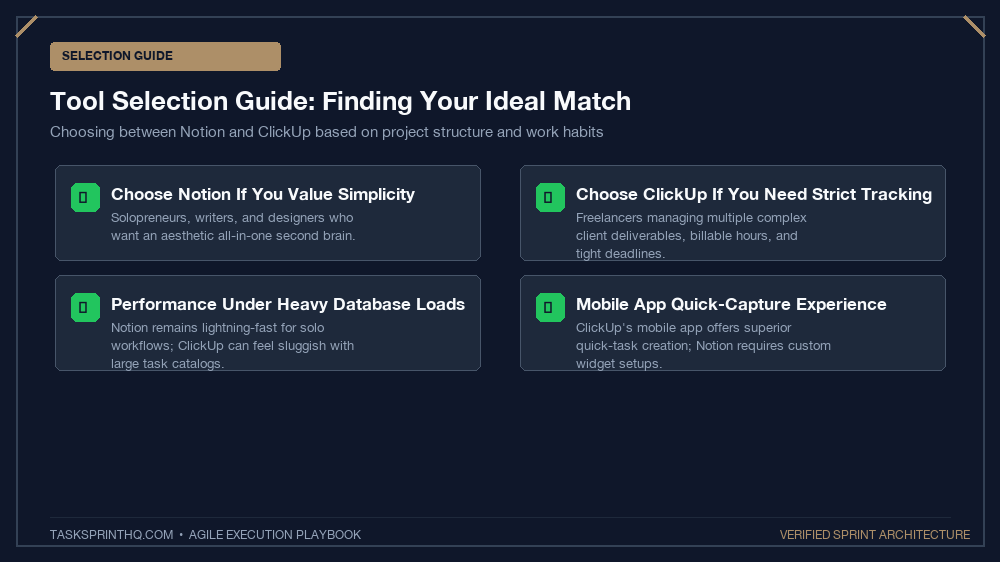
The choice between these two platforms depends on your specific professional archetype:
Choose Notion If:
- You are a writer, researcher, independent designer, or creator whose primary work consists of writing and deep documentation.
- You prioritize visual elegance and a calm, minimalist aesthetic that reduces daily cognitive friction.
- You want your sprint board, CRM, content calendar, and client portal integrated into a single unified workspace.
Choose ClickUp If:
- You are a freelance software developer, agency owner, or technical consultant with multiple complex client handoffs.
- You require native billable time tracking and client reporting directly tied to task completion.
- You want automated sprint rollovers and velocity calculation without manually configuring database relations.
Automating Sprint Rollovers: Formulas vs. ClickApps
One of the most tedious moments in agile project management occurs at the end of a sprint cycle when incomplete tasks must be carried over. In ClickUp, this is entirely automated: when you click ‘Close Sprint’, a dialog automatically offers to move uncompleted tasks into the next sequential sprint or return them to the backlog with one click.
In Notion, achieving automated rollovers requires either complex database filter views or advanced Notion Formulas (2.0) that compare the current date with sprint start and end properties. While Notion’s modern formulas allow dynamic status calculation, users who dislike database formulas will find ClickUp’s native toggle switch vastly more convenient.
Performance at Scale: 500+ Tasks Benchmark
When evaluating tools for multi-month or annual projects, database latency becomes a real consideration. Notion handles thousands of database rows with ease, provided you maintain clean database views with pagination limits. ClickUp workspaces with heavy custom field configurations can experience noticeable UI lag on complex dashboard views when lists exceed several hundred tasks. Keeping your active sprint views tightly filtered preserves snappy performance on both platforms.
The Verdict: Build Your Stack and Stop Tweaking
The greatest trap in digital productivity is “tool hopping”—migrating your sprint database every two months in search of perfection. Both Notion and ClickUp possess more than enough capability to supercharge your agile execution. Pick the tool that aligns with your brain’s natural workflow today, lock in your sprint board, and focus your energy on shipping meaningful deliverables.