

Cross-functional project teams waste hundreds of hours each quarter asking a simple, avoidable question: “Can I start working on this yet?” A copywriter waits indefinitely for marketing research; a developer waits for UI mocks; a video editor waits for sound design. When task handoffs depend on manual Slack pings, projects stall and deadlines slip into chaos.
Implementing a comprehensive asana task dependencies prevent bottlenecks system transforms reactive project delivery into an automated, synchronized machine. By configuring parent-child dependencies and automated status handoffs in Asana, team members are notified the instant their work is unblocked, eliminating project lag completely.
What Are Task Dependencies in Asana?
In modern project architecture, a dependency signifies a non-negotiable relationship between two deliverables: Task B cannot logically begin or complete until Task A reaches completion. As outlined in the official technical documentation from Asana, dependencies establish critical path connections across your project timeline.

When you designate a task as “Dependent On” another task in Asana, the platform enforces three powerful structural safeguards:
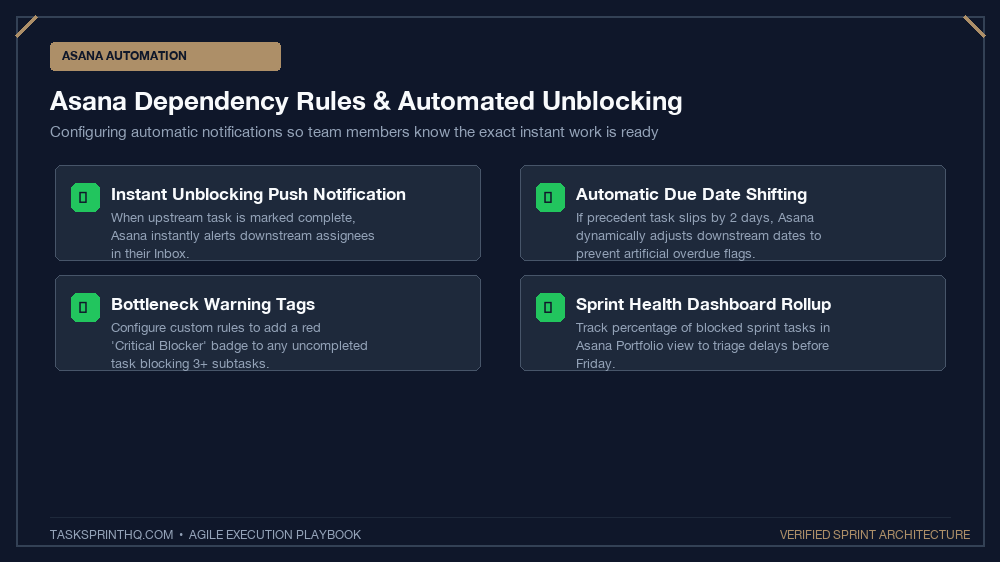
- Visual Bottleneck Flags: The dependent task displays a visible banner indicating it is blocked by another task, preventing team members from starting work prematurely.
- Automated Hand-off Triggers: The instant the upstream task is marked complete, Asana immediately notifies the assignee of the dependent task that their work is ready to begin.
- Timeline Dynamic Rescheduling: If the upstream task’s due date slips by three days, Asana automatically shifts all dependent downstream deadlines forward, preserving timeline integrity.
The Critical Path Principle:
Your project will only ship as fast as its longest chain of dependent tasks. Managing dependencies is not administrative busywork; it is active management of your delivery timeline.
The 4-Step Guide to Configuring Dependencies in Asana
To implement bulletproof dependencies across your project roadmaps, follow this step-by-step setup protocol:
Step 1: Map the Sequence (Identify Upstream & Downstream)
Open your project plan and examine your deliverables. Determine which tasks are strictly sequential versus which can be executed concurrently in parallel:
- Upstream Task (The Blocker): “Design Figma Wireframes for Checkout Flow”
- Downstream Task (The Blocked): “Develop React Frontend Components for Checkout”
Step 2: Link the Tasks Using Asana’s Dependency Field
Open the downstream task card in Asana. Click on the Dependencies field (or press Tab + D on your keyboard). Select “Blocked by” and search for the upstream task. Asana now establishes an explicit relational link between the two deliverables.
Step 3: Embed Complete Context in the Upstream Card
An automated dependency notification is useless if the handoff contains vague instructions. Ensure the upstream card satisfies our strict standards for writing clear task briefs that eliminate follow-up questions so the downstream assignee can execute immediately upon notification.
Step 4: Enable Automated Date Shifting
Open Asana Project Settings and toggle on “Auto-shift dependency dates”. When unexpected obstacles delay an upstream deliverable, downstream team members do not need to manually edit forty separate due dates; Asana recalculates the entire schedule automatically.
Dependency Architectures: Sequential vs. Parallel Chains
Understanding how different dependency models affect team velocity helps you design realistic project schedules:
| Model Type | Structural Setup | Risk Level | Best Use Case |
|---|---|---|---|
| Linear Sequence (Waterfall Chain) | Task A → Task B → Task C in single file | High (Any single delay delays entire project) | Regulatory audits, legal contract approvals, database schema migrations |
| Fan-In Chain (Consolidation) | Tasks A, B, and C all block single Task D | Moderate (Must track all 3 streams closely) | Product launch page (requires copy, design, and analytics simultaneously) |
| Fan-Out Chain (Dispersal) | Single Task A blocks Tasks B, C, and D | Low (Once Task A clears, 3 streams move at once) | Brand identity approval (unblocks website, pitch deck, and social banners) |
Supercharging Dependencies with Asana Rules
Combine Asana’s native dependency features with automated Custom Rules to eliminate manual project coordination:
Rule 1: Auto-Move to ‘Ready to Start’ Section
Trigger: Task is no longer blocked.
Action: Move task to section “Ready for Active Sprint” and send inbox notification to assignee. This prevents unblocked tasks from languishing unnoticed in backlog sections.
Rule 2: Auto-Assign QA Reviewer on Completion
Trigger: Engineering task marked complete.
Action: Create dependent task “QA Staging Verification”, assign to Lead QA Engineer, and set due date to 24 hours later.
Managing Cross-Functional Remote Handoffs
When dependencies span multiple distributed squads, coordinating handoffs requires organizational empathy. Align your Asana dependencies with our operational blueprint for managing project dependencies across cross-functional remote teams to prevent cross-department silos.
Common Dependency Pitfalls to Avoid
Beware of three common traps when configuring dependencies:
- Over-Chaining (The Micromanagement Trap): Creating dependencies between minor 10-minute tasks. Only chain significant deliverables that represent true operational handoffs.
- Circular Dependencies: Setting Task A to block Task B, while Task B accidentally blocks Task A. Asana will warn you, but always ensure your critical paths flow logically forward.
- Ignoring Upstream Delays: If an upstream task is delayed, do not leave the downstream assignee in the dark. Leave a comment on the blocked card explaining the reason for the schedule adjustment.
Asana Timeline Gantt View vs. Board View for Dependencies
While Asana’s Board view is fantastic for daily standup check-ins and dragging cards between sprint columns, it hides dependency relationships. To audit cross-functional risk, project leads should switch to Asana’s Timeline View at least twice per week.
In Timeline view, dependencies appear as physical connecting arrows linking task bars on a chronological calendar. When an upstream task is rescheduled, the visual connector turns red if it overlaps with a downstream deadline, making scheduling collisions immediately obvious before work begins.
Resolving Cross-Squad Dependency Deadlocks
What happens when Squad Alpha and Squad Beta find themselves in a circular blocker? Tech leads should convene an immediate 15-minute ‘Contract Alignment’ huddle. Rather than waiting for full feature deployments, establish interim JSON schemas or API mock contracts so both engineering teams can resume independent development without waiting on live staging environments.
Build a Predictable Project Delivery Engine
Project bottlenecks are not inevitable bad luck; they are the direct result of unmapped dependencies. Configure your critical paths in Asana today, let automated notifications drive your handoffs, and experience the extraordinary peace of mind that comes with clockwork project execution.