
Small creative teams and solo project leads frequently dive directly into execution without refining their task lists. You draft a hurried bullet point like “Redesign checkout flow” or “Write marketing copy”, drop it onto your sprint board, and begin working. Two days later, progress grinds to a halt because essential assets are missing, copy specs are undefined, and technical dependencies were completely overlooked.
Integrating a disciplined sprint backlog grooming checklist for small projects prevents this mid-sprint friction. By spending forty-five minutes once a week pruning your task list, sharpening acceptance criteria, and archiving stale ideas, your sprint execution runs with smooth, uninterrupted momentum.
Why Small Projects Need Backlog Refinement
Backlog grooming (formally known as backlog refinement) is often dismissed as enterprise bureaucracy suitable only for large corporate software divisions. Yet as documented by the Agile Alliance, backlog refinement is essential for any initiative because it guarantees that upcoming items represent real value and are immediately actionable.
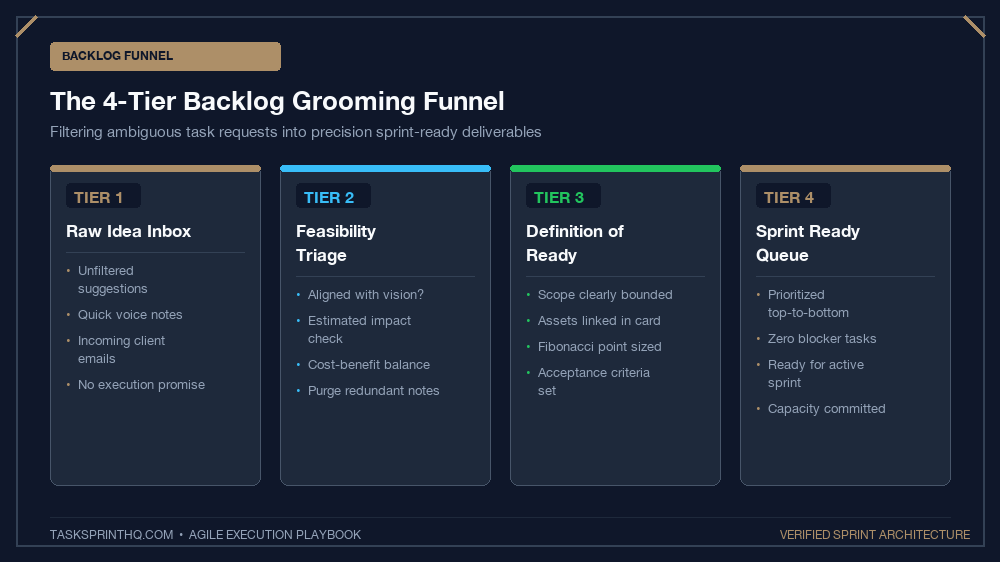
In small creative projects—such as website redesigns, branding campaigns, or content launches—ambiguity is the primary cause of missed deadlines. Refining tickets before they enter a sprint ensures that when you or your team sit down to build, every question is answered and zero time is wasted hunting for lost assets.
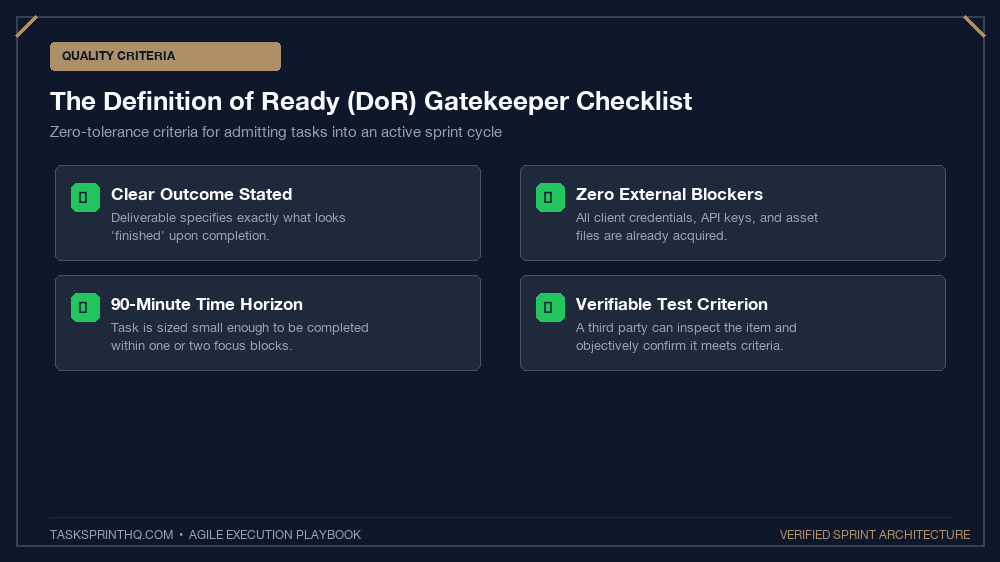
The Definition of Ready (DoR):
A backlog item is ready for sprint commitment only when it has clear acceptance criteria, all necessary source assets attached, no blocking upstream dependencies, and an estimated effort under two days.
The 7-Step Backlog Grooming Checklist
Execute this practical checklist weekly before locking in your next sprint cycle:
Step 1: Archive or Delete Stale Backlog Clutter
Backlogs naturally accumulate speculative ideas that felt exciting three months ago but no longer align with core project goals. Review items untouched for sixty days. If an item is not being scheduled within the next three weeks, archive it. An uncluttered backlog provides cognitive breathing room.
Step 2: Clarify the User Outcome
Transform vague task titles into concrete outcome statements. Replace “Hero banner images” with “Export 3 responsive hero banners (WebP format, under 150KB) matching new visual brand palette”.
Step 3: Define Bulletproof Acceptance Criteria
Every ticket must outline what success looks like in verifiable terms. Writing clear criteria prevents subjective debate at the end of the sprint. If you want to streamline this across your team, follow our guidelines on writing clear task briefs that eliminate follow-up questions.
Step 4: Break Giant Epics into Micro-Milestones
Any task estimated to take longer than six to eight hours contains hidden complexity. Split oversized deliverables into bite-sized units. For detailed instructions on slicing creative work, explore our framework for setting micro-milestones in a 1-week sprint cycle.
Step 5: Verify Upstream Asset Dependencies
Confirm that all required inputs are physically staged and accessible:
- Are brand guidelines and vector logos linked directly in the ticket?
- Are copy documents approved and finalized by stakeholders?
- Are API keys, hosting credentials, or staging environments accessible?
Step 6: Size the Effort Realistically
Assign a simple effort rating (Small, Medium, Large, or Fibonacci story points). If a task feels uncertain or unpredictable, pause and conduct a 30-minute discovery spike before committing it to a live sprint.
Step 7: Prioritize Based on Business Impact
Arrange your groomed backlog in a strict vertical stack. The highest-priority item sits at the absolute top, followed by the next. Never allow two items to share the top position.
Backlog Health Audit: Weak vs. Groomed Tickets
Examining how a raw idea transforms into a sprint-ready ticket illustrates the profound value of weekly refinement:
| Component | Raw Unrefined Ticket | Groomed Sprint-Ready Ticket |
|---|---|---|
| Title | “Fix email newsletter signups” | “Embed ConvertKit popup modal on blog posts with exit-intent trigger” |
| Acceptance Criteria | None (“Make sure it works on mobile”) | 1. Modal fires on exit intent desktop 2. 30s delay on mobile 3. Tagged as ‘blog-subscriber’ |
| Dependencies | Unknown API keys; copy unwritten | API token stored in 1Password; copy approved in Google Doc #14 |
| Effort Estimate | “Maybe a couple of days” | 3.5 hours (Medium) |
The 10-Minute Daily Backlog Sweep
While the comprehensive 45-minute refinement occurs once a week, top practitioners maintain backlog hygiene through a rapid daily sweep. Each afternoon before closing your workspace, spend ten minutes checking newly created items. When team members or clients drop fresh requests into your board, immediately assign tags, link missing references, or flag unclear scope.
Preventing raw tickets from languishing without context ensures that when your weekly refinement session arrives, you are not faced with a mountain of mysterious, half-baked bullet points. Small daily prunings keep the entire project pipeline moving briskly.
Common Small Project Grooming Anti-Patterns
Beware of two frequent pitfalls when refining creative backlogs:
- The “Ghost Dependency” Trap: Assuming another team member will produce assets without confirming their capacity. Always tag the asset owner explicitly on the card.
- The “Infinite Refinement” Loop: Over-analyzing minor details for tasks three months away. Only refine tickets scheduled for the upcoming two sprint cycles; leave distant ideas at high-level summary form.
How Frequently Should You Groom?
For small teams and solo creators, keep the grooming cadence lightweight and consistent:
- The 45-Minute Mid-Sprint Refinement: Run grooming on Wednesday afternoon. Review tickets scheduled for next week’s sprint while your current momentum is high.
- The 10-Minute Pre-Sprint Polish: On Friday afternoon or Monday morning, give the top five tickets a final sanity check before pulling them into your active sprint board.
Creative Asset Specification Template for Tickets
When grooming tickets for visual design, video editing, or copywriting, include this standardized specification block directly in the task description:
Target Dimensions: 1920×1080 (Desktop), 1080×1080 (Square Mobile)
File Format & Sizing: WebP, maximum file weight under 180KB
Brand Constraints: Use secondary palette accent #ad8f68; zero stock photography faces
Destination Folder: Shared Assets / Sprint-42 / Hero-Exports
Grooming Differences: Solo Creators vs. Small Agile Teams
While solo creators can groom tickets in a quiet 20-minute coffee session focusing on personal asset staging, small agile teams of three to five people should use refinement to build shared mental models. Team grooming highlights hidden assumptions between designers and developers, ensuring no handoff surprises occur during active sprint blocks.
Refine Early, Build Effortlessly
Spending forty-five minutes grooming your backlog is not administrative overhead—it is an investment in uninterrupted creative focus. Adopt this sprint backlog grooming checklist for small projects, eliminate mid-sprint confusion, and enjoy the confidence of launching every sprint with complete clarity.